Product
Writing Specs your auditor can actually read

Mei Lin Tan
·
·
4 min read

This week we started rolling out Specs to every Enterprise workspace. They are company-wide rules that each Chamfer app follows while it’s being built, written the way you’d explain them to a new hire. Since the beta opened in June, 2,300 workspaces have written at least one.
A good rule does two jobs. It tells the builder what not to do, and it gives an auditor a sentence they can test.
Start with a sentence you’d say out loud
The best rules read like policy, not code. “Never show the salary column outside the People team” can be checked in one read. Chamfer turns it into a column-level permission on every app that touches that table, including apps nobody has built yet.
Compare a rule written for a machine: deny select on hr.salary where role <> 'people'. It’s precise, but your auditor has to translate it before they can agree with it.
Plain language also widens who can write the rules. In the beta, 70% of them came from someone outside engineering: a data lead, a compliance manager, a head of support.
Four patterns cover most rules
Nearly every rule in the beta took one of four shapes:
Hide: keep a column or table out of every app, or out of every app for one group.
Limit: restrict rows by a field on the user, such as site, region or team.
Hold: make a kind of write wait for a named approver, often above an amount.
Record: require a reason and a Logbook entry for a certain kind of change.
If a rule doesn’t fit one shape, it’s usually two rules. “Only site managers can approve overtime above 10 hours” is a Limit and a Hold. Written as two rules, each can be tested, changed and retired on its own.
“Clinic managers build their own rota tools on Stockroom, and the row-level rules mean nobody sees a patient outside their site.”
Priya Raman, Director of Data, Fennimore Health
Write the threshold, not the intent
“Large refunds need approval” leaves the builder guessing. “Refunds over $500 need a second approver from Finance” doesn’t. A number makes a rule testable, and it shortens the first review because nobody argues about what “large” means. The same goes for groups: name the group from your identity provider, not a job title. “Finance” can mean four teams. The Okta group finance-approvers means one.
Each rule is stored as plain text with a few structured fields, so it can be versioned and reviewed like any other change:
Try a rule before it’s enforced
Every new rule runs in report-only mode for seven days. The Logbook lists each app and query it would have changed, so you see the effect before anything is blocked. Most teams find one or two surprises that week, usually an old app reading a column nobody remembered. You can extend the window, or end it early once the report is clean.
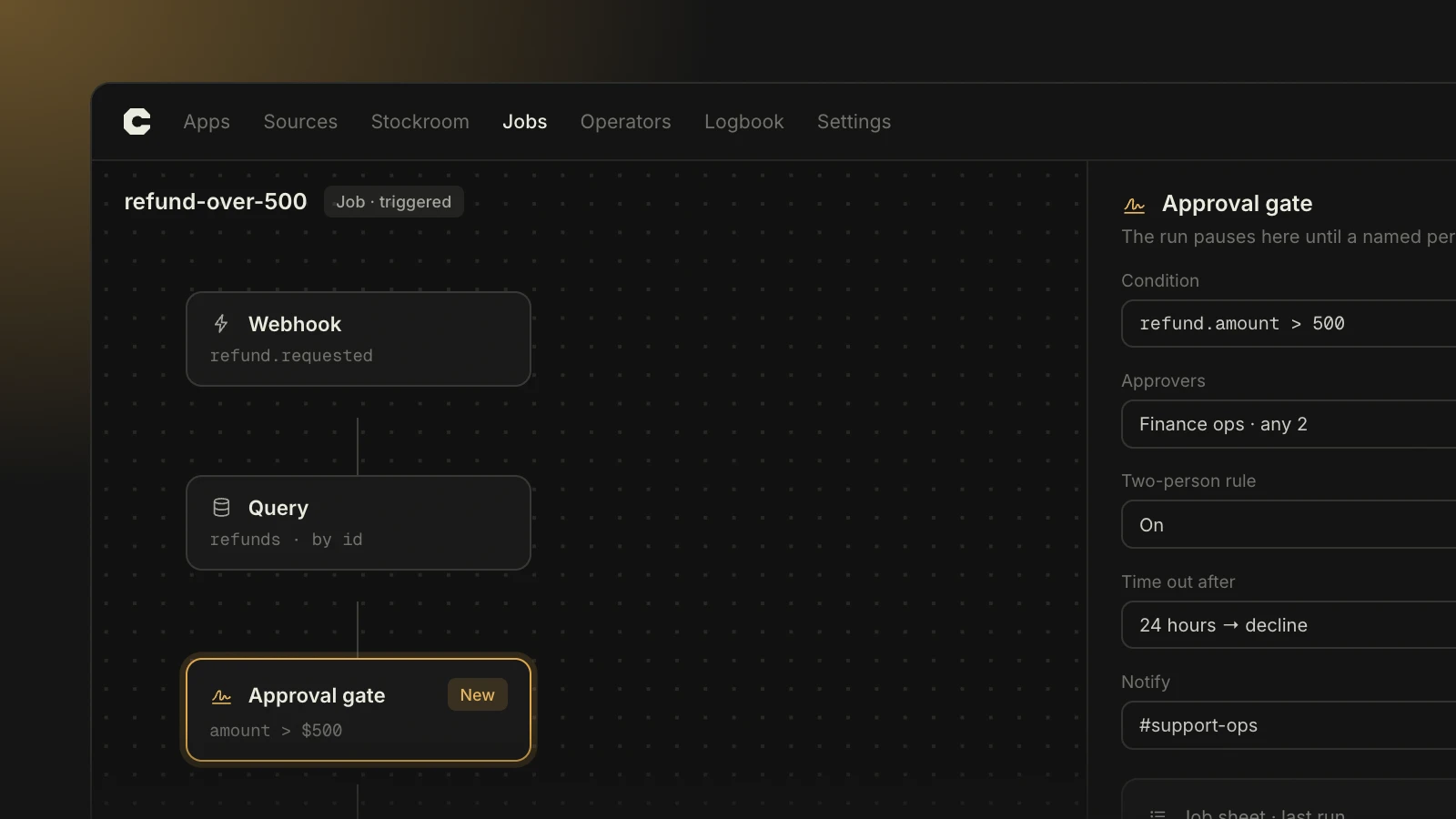
A Hold rule at work: the write waits for a named approver, and the Logbook records who released it.
Give the list one owner
Rules work best with one owner, usually in security or compliance, and many contributors. Anyone in the workspace can propose a rule. The owner reviews it like any other release, with a list of the apps it would change, and ships rule changes on a schedule builders know about. Most teams batch them weekly, so nobody is surprised halfway through a build.
How long the list should be
The workspaces with the fewest review delays keep between 8 and 15 rules. Past about 30, rules start to overlap and builders stop reading them. Review the list each quarter and retire anything no app has triggered in 90 days.
Keep reading

What 1,400 companies taught us about approving AI-built apps
We tracked a year of sign-offs across 38,000 apps. The fastest teams didn't review less. They settled the hard questions before anyone wrote a prompt.

Nadia Keller
·

Build Chamfer apps from Claude, Cursor or Codex
Chamfer MCP is live on every plan. Connect your editor, build under your own role, and every change still lands in the Logbook with a name and a diff.
Mei Lin Tan
·